 HazelJS
The Agent OS for TypeScript
Operate agents like production systems.
Frameworks help you build agents. HazelJS helps you run them — durable, governed, local-first.
Get started
Local Agent OS in minutes
Install CLI
$ npm install -g @hazeljs/cli- 1
Create an agent
$ hazel new agent support-agent - 2
Install deps
$ cd support-agent && npm install - 3
Apply (starts hazeld)
$ hazel apply
Install → Apply → Running · survives closing the terminal
Why an Agent OS?
Frameworks get you to a demo. An Agent OS keeps agents alive in production — durable runs, governance, and local apply in TypeScript.
01
Frameworks help you build
Prompt loops and tools get you to a demo.
02
Agent OS helps you operate
Durable runs, Gatekeeper, DNA, and HITL keep agents running for real.
03
Local-first TypeScript
hazel apply on your laptop. Cloud and Kubernetes are optional.
Five layers. One Agent OS.
Define → Run → Decide → Govern → Survive — inside your TypeScript backend.
Architecture
Inside HazelJS Agent OS
Define & Deploy
Version identity, prompt, skills, and policies as DNA. Declare desired state with Store/Apply — tools stay in TypeScript.
Run
Agent Runtime executes the loop. Agent VM classifies effects and enables speculation/undo. Organism self-organizes specialists from a mission and environment signals.
Decide
Bounded closed-set judgment before side effects. Evidence, judge, critic, and confidence inform policy — never authorize. Default provider is native hazel-agent, not an external-model wrapper.
Govern
Skillgate curates which APIs become capabilities. Gatekeeper authorizes each tool call — default deny, approvals, rewrite.
Survive
Durable runs, crash-safe HITL, leases, state, and recovery — so agents outlive process restarts.
TypeScript / Node.js Backend
Runs beside your APIs — local-first, no separate runtime plane required.
Define → Run → Decide → Govern → Survive
Clone Meridian — see the whole Agent OS
One repo that teaches DNA vs tools, Store vs platform vs run, Skillgate, router, and HITL. Copy the pattern into your product.
01
store:sync
Publish DNA packages + lockfile
02
platform:sync
Apply Definitions / Deployments
03
npm run dev
Chat with real @Tool handlers
terminal
git clone https://github.com/hazel-js/hazeljs-meridian-ops.git
cd hazeljs-meridian-ops && npm i && npm run store:sync && npm run platform:sync && npm run dev
Local Store is enough to start. Hosted registry (promote/share packages) is an optional Team SKU — never required for local correctness.
 Coming soon
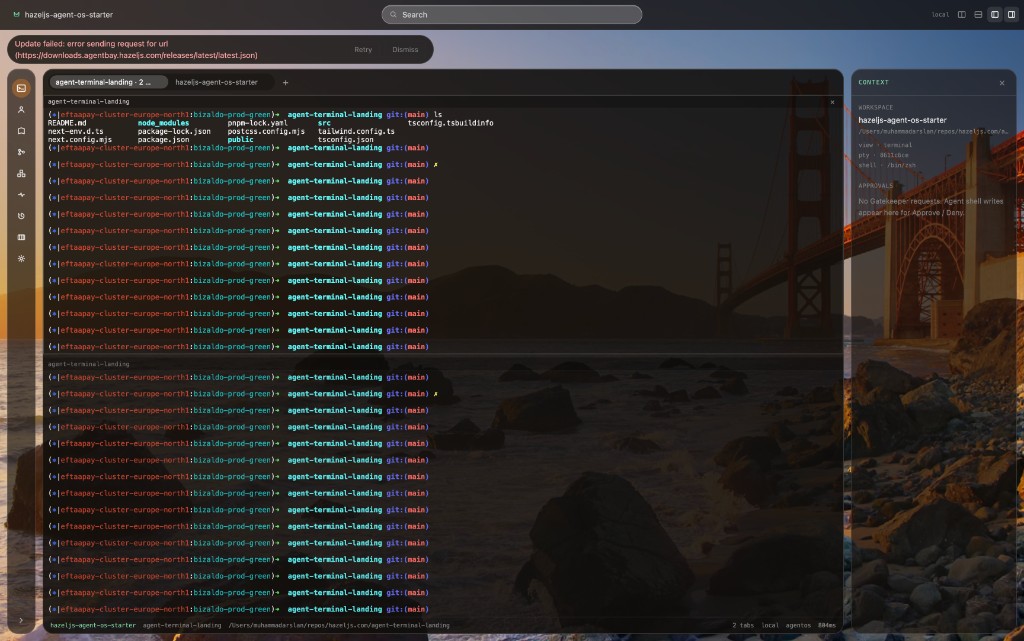
Agent Bay
Your shell. Your agents. One bay.
Native PTY first — Mission Control and Gatekeeper when you want agents. Watch the same Shell → Propose → Gatekeeper → Approve → Run loop as the product site.
- 01 · Shell
- 02 · Propose
- 03 · Gatekeeper
- 04 · Approve
- 05 · Run
Zynli — production SaaS on the HazelJS stack
Proof that HazelJS packages ship real products. Zynli is multi-tenant AI support (RAG, flows, billing) — supporting ecosystem, not the Agent OS teaching path. For DNA, HITL, Skillgate, and apply, clone Meridian.

Zynli.AI
Live in productionMulti-tenant AI support — RAG, flows, billing, and real-time handoff. Built by HumanBee AB.
01
Agentic RAG inbox
Visitors get KB-grounded answers first; low-confidence turns escalate to live agents with full context.
02
Guided flows & tools
Intent routing runs order tracking, ticket creation, and custom HTTP actions — HazelJS stack patterns in production.
03
Production SaaS stack
Multi-tenant workspaces, subscriptions, real-time Socket.IO, and an embeddable React widget — shipped, not a demo repo.
HazelJS stack in production
Try the support widget on this page — it runs on the same HazelJS RAG stack as Zynli.
// KB → guided flow → ticket bot → LLM → human handoff
await askRag(question, tenantId, { sessionId });
await matchVisitorIntent(tenantId, message);
await tryExecuteVisitorFlow({ conversationId, tenantId, ... });
Explore
Build your first agent
Five minutes on your laptop. Apache 2.0. No cloud required.